Quick verdict
Sending the cold email is the easy half. The problem starts the moment somebody replies. The reply lands on Friday evening, a rep sees it on Monday, the context has gone cold, and a real opportunity turns into another row in the CRM.
The Leeeds AI sales agent covers exactly that gap. It is attached to one specific email in the sequence and wakes up only when someone replies to that email. It then drafts an answer from the material you connected yourself, attaches the sources it used, and hands it to you for approval. By default nothing leaves without a human.
An automation that invents facts is worse than no automation
In cold outreach, the single reply you get out of dozens of attempts is the valuable one. If a language model answers it by guessing a price, a lead time or a reference customer, you damage the relationship faster than if you had never answered at all.
So the agent runs on three fixed rules: it answers strictly from the connected material, every claim carries a pointer to the exact part of the source it came from, and when the answer is not in the material it declines to write it and hands the conversation to you. It will not buy confidence with a made-up fact.
What happens between the reply and the answer going out
The run is a straight line: a reply arrived → should we answer at all → what does your material say → you approve → it goes out with a human delay.
The reply lands on the right step
The incoming email is matched to the exact sequence step the agent is attached to. An agent on a different step does not fire. At the same time the remaining follow-ups stop, if you have “Stop after reply” switched on.
It first asks whether to stay quiet
Unsubscribe, a complaint, a clear rejection, a legal or contract question, an out-of-office auto-reply - the agent does not respond to any of it. The conversation goes to a human and no draft is stored. It behaves the same way when the lead is already marked “no interest” in the CRM.
It looks the answer up in your material
The incoming text is matched against the material you connected. The most relevant parts are pulled out and the answer is assembled only from those. Every part used stays attached to the draft as a citation with its location - page 3, row 12, a specific URL.
What it does not know, it admits - and flags
Missing material, an uncited price, a commitment that is not in the sources: each of those is marked as a risk and the agent recommends handing the thread to you. The draft is not hidden in that case; it simply states what needs to be filled in.
You send, with a human gap
By default the draft waits for your approval. Once approved, Leeeds sends the reply at a random point inside a 60-240 minute window, and optionally only within the campaign's active hours, so it never lands a second after the contact's own email.
The same thing, inside the product
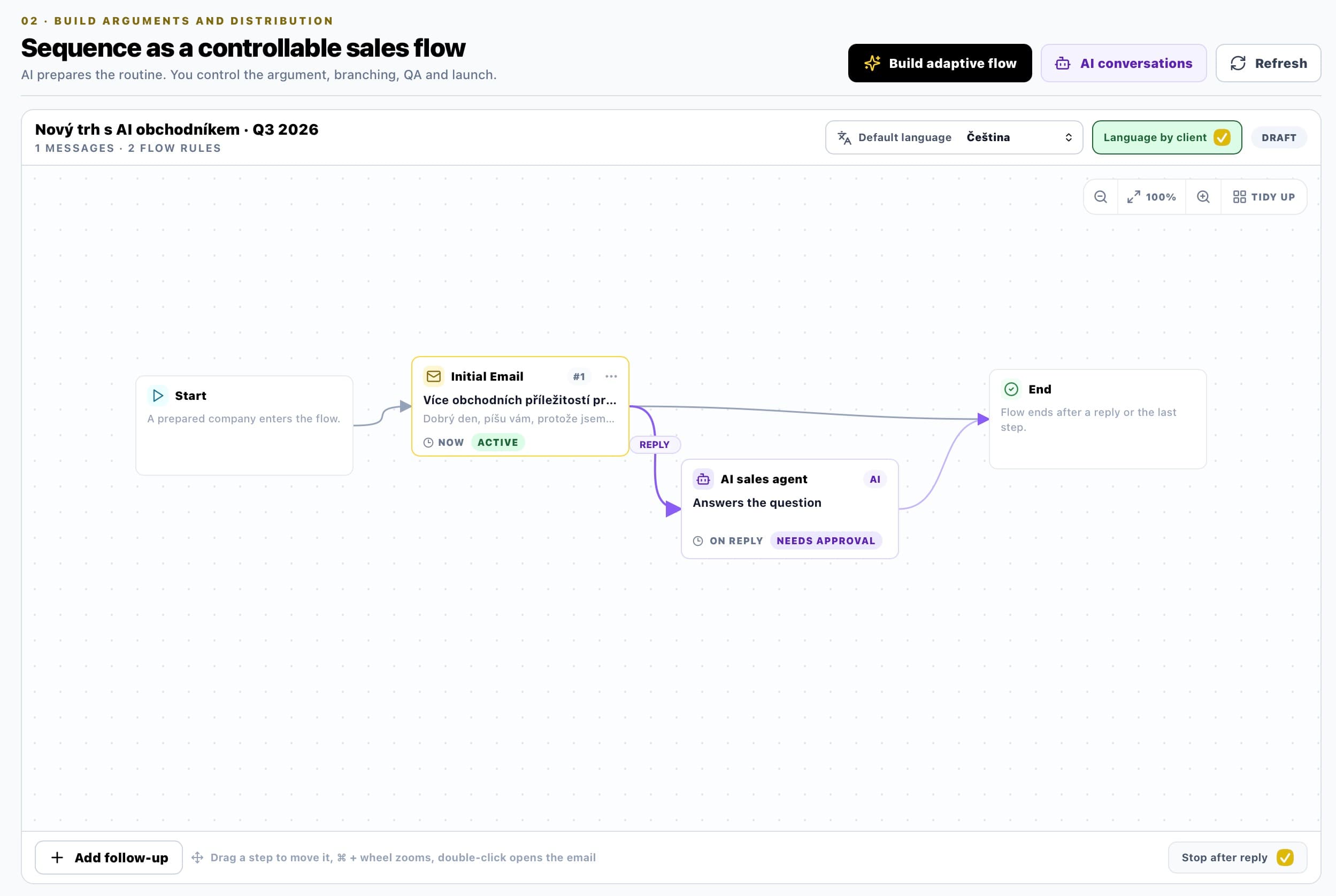
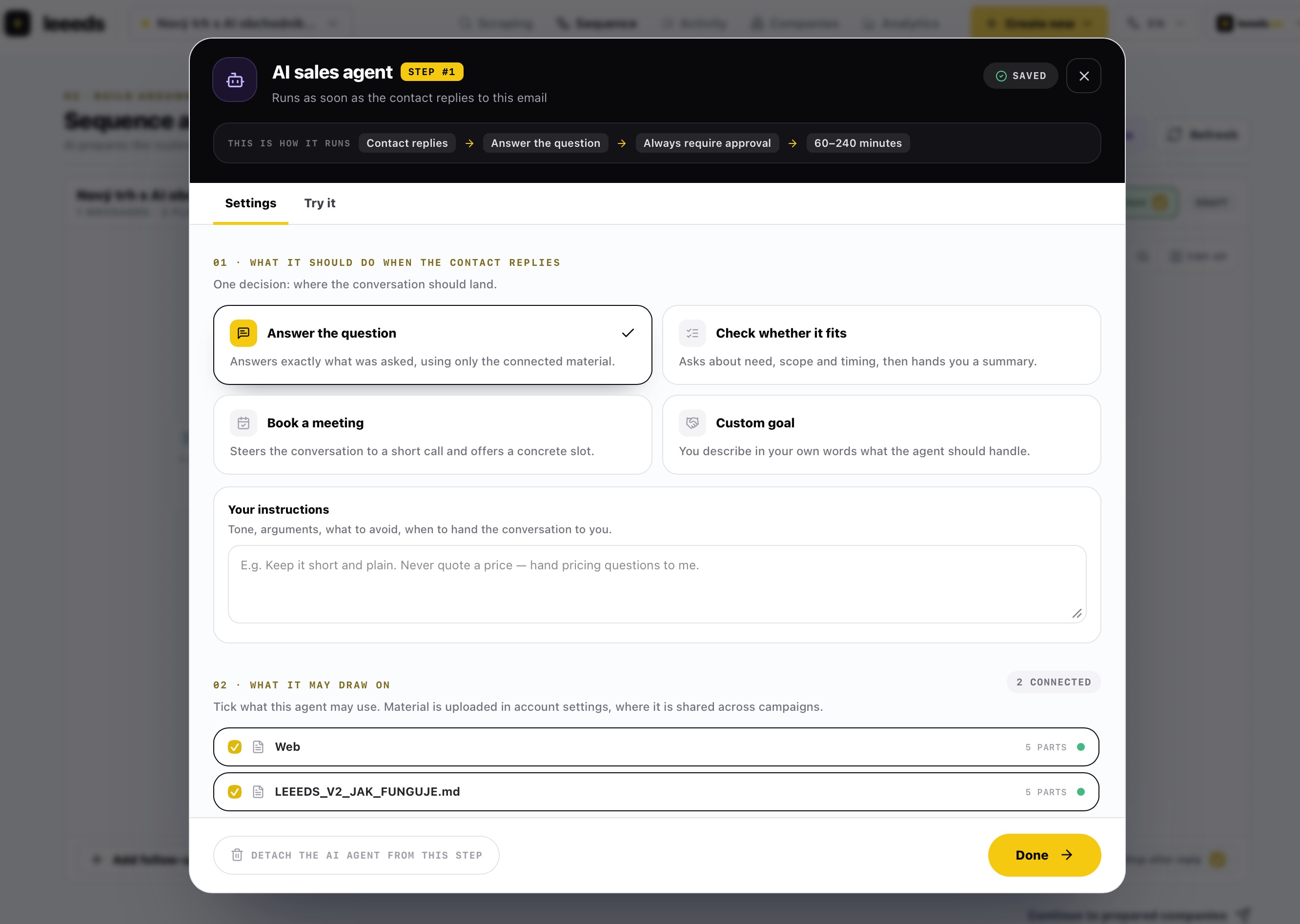
Both screens below are real captures from the Leeeds portal, not illustrations. The captions point at elements you can actually see in the image.
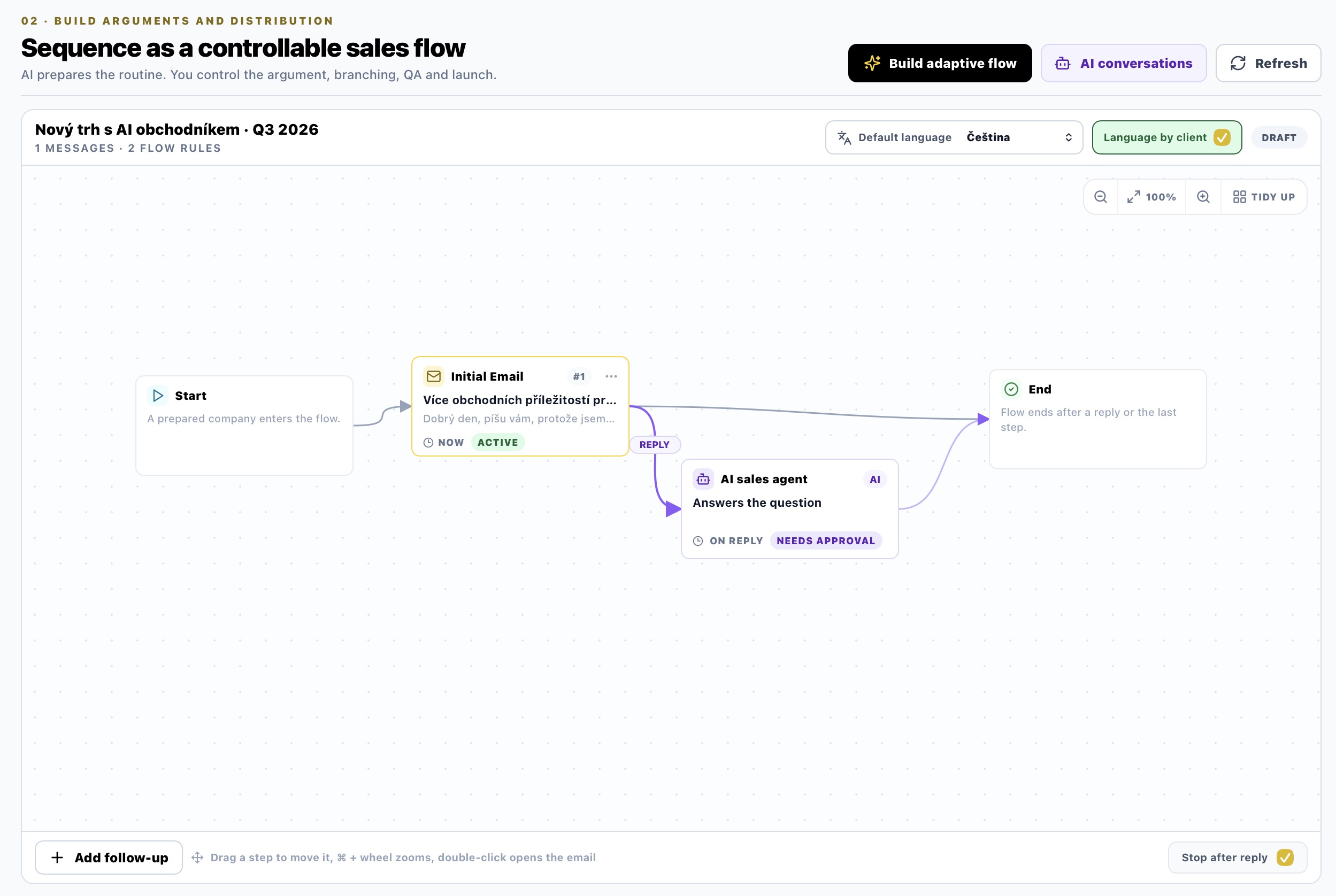
A campaign is a canvas, not a spreadsheet. Start leads into the first email (chip NOW · ACTIVE), a violet REPLY branch leads from it into the AI sales agent node, and from there into the end of the flow. The agent node carries its own state: ON REPLY (when it fires) and NEEDS APPROVAL (that nothing goes out without you). The top bar switches the campaign's default language and “Language by client”; the bottom bar holds “Stop after reply” - whether a reply cuts the rest of the sequence.
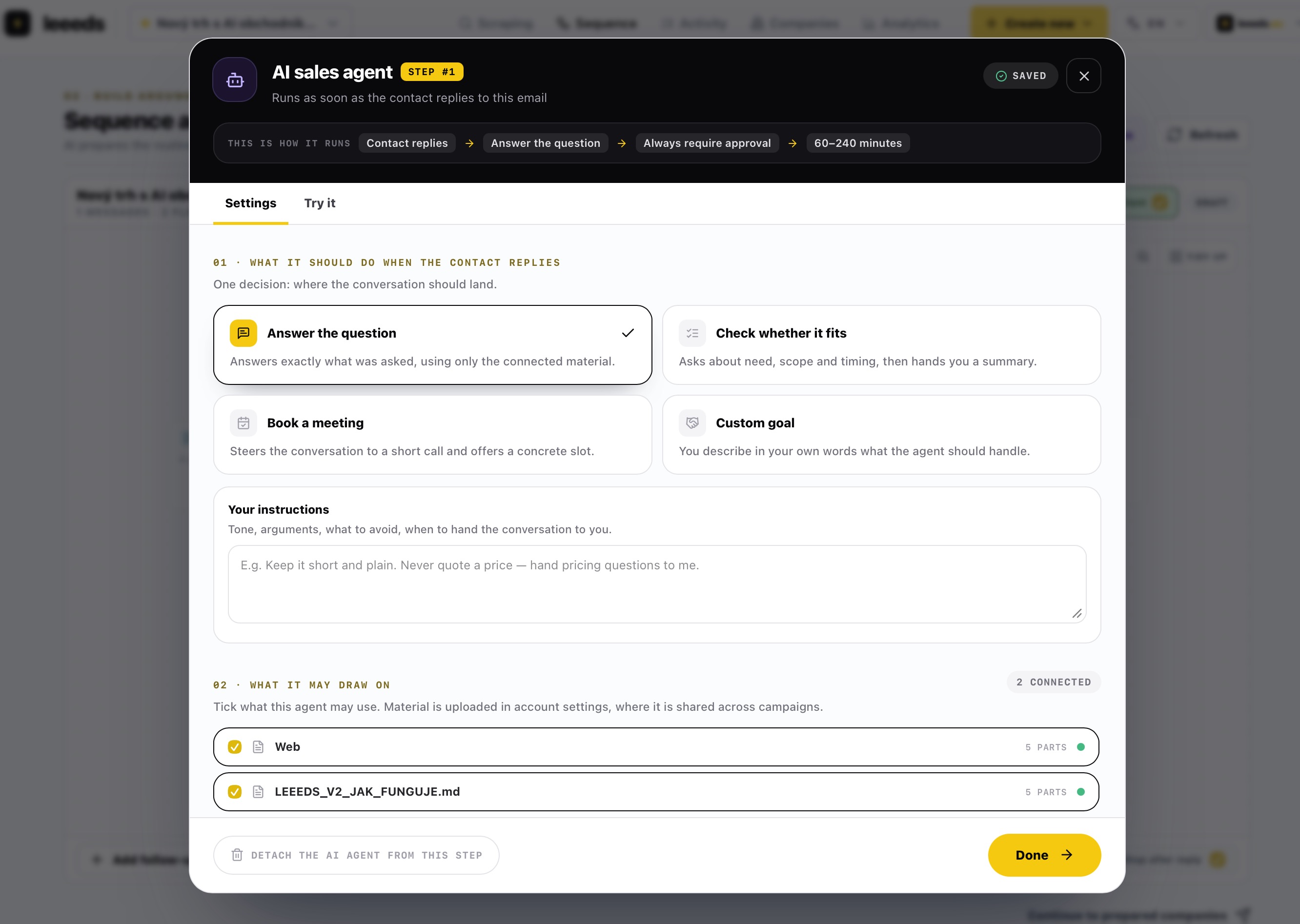
The “THIS IS HOW IT RUNS” strip is the whole behaviour on one line: Contact replies → Answer the question → Always require approval → 60-240 minutes. Below it you pick one of four goals, add your own instructions (tone, what to avoid, when to hand the conversation over) and tick the material. The number next to a source - 5 PARTS - is how many parts the document was split into; the agent works with parts, not with whole files.
What you configure
The goal. Answer the question, check whether it fits (need, scope, timing, plus a summary for you), book a meeting, or a custom goal in your own words. The goal changes where the agent steers the conversation - not how freely it may treat facts.
The material. It is uploaded once at account level and shared across campaigns: a file, a link, a whole website, or plain text. A website is crawled up to fifty pages; PDFs are read page by page, with OCR for scanned ones. On each sequence step you then simply tick which sources that particular agent may use.
Approval. The default and recommended mode is “always require approval” - the draft waits, you can rewrite it, and only then does Leeeds send it. The second option is draft-only: the reply stays in the conversation and you send it yourself. Autonomous sending is not the default state and does not switch itself on.
Pace and length. The delay window can be set anywhere from 15 minutes to 48 hours. The agent either replies once and hands the thread over, or keeps the dialog going until the goal or the reply limit is reached (1 to 10, three by default). A checkbox keeps sending inside the campaign's active hours.
A dry run. The “Try it” tab takes a text you paste in as an incoming reply and shows the draft together with its citations and risks - without sending anything. A reply you consider correct can be saved straight away as new material.
Hard facts. Prices, lead times, capacity and guarantees are stored apart from documents - as a value with an expiry date. The agent may state a figure only from there and exactly as written. Once it expires, it stops saying it the same day. With no price on file, a pricing question still hands the conversation to you.
Calendar. For the booking goal the agent offers three genuinely free times, holds them until the contact answers, and on confirmation creates the event with an invitation - only after the reply has gone out, so a rejected draft never fills a diary. If you would rather not connect an account, you subscribe to a private link instead.
How the agent behaves in a real thread
The contact asks about a technical parameter that is in the connected PDF: the agent answers precisely and attaches the page it took it from.
The contact asks about price: if it is on file as a fact and still valid, the agent states it exactly and shows where it came from. If not, it invents nothing - it flags the missing material and hands the conversation to you.
The contact replies “thanks, not interested”: the agent writes nothing, the thread goes to a human and the remaining follow-ups stop.
The contact writes again before you approve the first draft: the old draft is cancelled and replaced, so you never send an answer to a message that no longer applies.
You rewrite a draft before approving it: the agent keeps your wording as a style example and writes closer to your tone next time.
The contact accepts one of the offered times: once the reply goes out, the event is created with an invitation, and the lead flips to “meeting booked” and is marked hot.
Why it is built this way
Speed without risk
01An answer in hours, not days
The draft is ready the moment the reply lands, but goes out with a human gap and after your approval.
Verifiable
02Every claim has a source
The draft shows which part of which document the answer was built from.
Cost
03Replies are free
Credits are counted per contact only. The agent replying to a contact you already paid for is not charged.
The AI sales agent is the last link, not the first
Scraping finds the companies, the sequence opens the conversation. The agent only matters at the point where there is something to save - when somebody replies and time starts working against you.
That is why we keep it deliberately narrow: one step, one trigger, explicit material, explicit approval. We would rather have an agent that sometimes says “I do not know this, take it over” than one that sounds confident and is wrong.
Keep reading
These related pages connect the strategy, compliance and real workflow behind Leeeds.
AI sales agent
How the agent handles numbers
Most AI tools either invent a price or dodge the question. Leeeds stores it as a fact with an expiry date: the agent repeats it exactly, shows the source, and stops saying it the day it expires.
Read next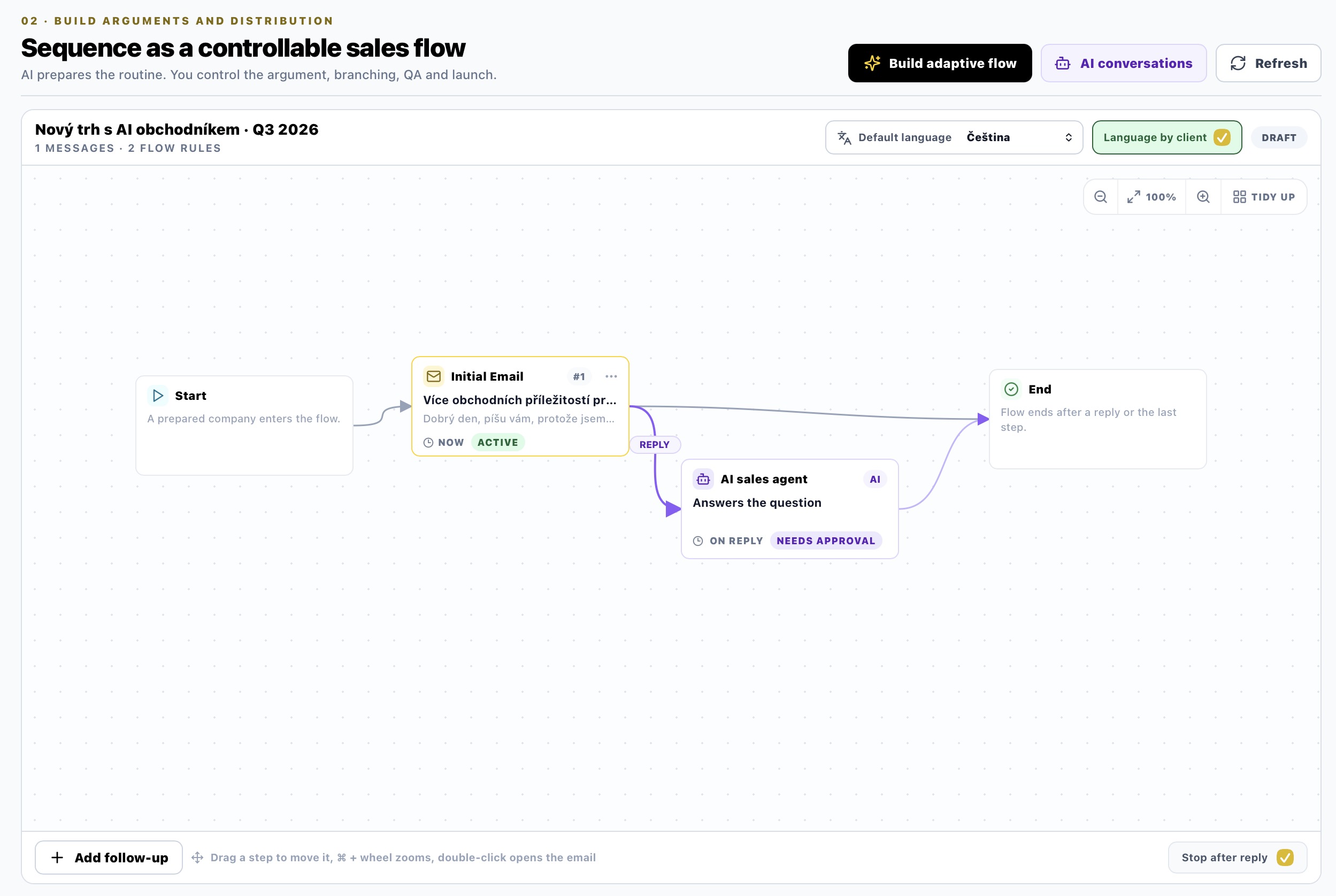
AI sales agent
How a meeting happens
Agreeing a meeting by email takes four extra messages and two days. Leeeds offers three genuinely free times, holds them, and creates the event with an invitation once confirmed.
Read nextAI sales agent
What people ask you
Leeeds records what was missing on every draft. That becomes a ranked list of the questions your market actually asks - and one click turns a question into material.
Read nextAI sales agent
Agent for inbound questions
On your site and in info@ sit people who are already interested. Leeeds answers them from the same material and facts as in a campaign - and invents nothing it cannot back.
Read nextChoose your next step
Compare Leeeds plans, included features and limits before creating your account.
Compare plansThis article describes the behaviour of the Leeeds AI sales agent as it is shipped in the portal. The screenshots are taken from the application; the campaign and copy shown in them are illustrative.